Innovation 13 – Dualities provoking Extensible thought

Use a set of ‘Dualities’ for features of the current commonly used solution to innovate

Innovation often starts from a pressing need which is not currently addressed by a particular solution, or any known solution, which fits a certain set of constraints.  Often the constraints are fairly stable over time, and much of society runs on past innovations which have become super stable and normal over time.  Suddenly there is a pressing need, for change, or something changed, provoking a change or response, which once again can be decided as a new need.

One way of looking at fast innovation is to look at the dual characteristics of something which exists and which would approximate that need.  Maybe something changed ? only a minor thing, not a major thing.

Write down the characteristics of the current normal object or thing, listing features, listing characteristics as much as possible.  Write down all of these separate characteristics in a two column list.

Then in the second column of the list, write down the opposite of the feature in the first column.

Once you get a list of opposites or the ‘dual’ of the feature in the second column.  Look through it and see if you can guess what combination of dual features might help you solve the new need.

Often innovations require a change of more than one feature or a set of features to change to cover the new need at the expense of other older needs which really we don’t solve any more. So with this approach, you can build new solutions and designs quickly based on a selection of ‘duals’ which can be rapidly prototyped.

Another method, slightly related is to take the feature dual, like {fast,slow} and expand it to {fast,slow,faster,slower}

Its just an idea, but it helps you understand WHY some features are important to the current usage, and which ones could be relaxed without too much trouble, and which if relaxed could allow new approaches and innovations to be created.

Speaker Driver Coniplasty

WARNING : Don’t read this if you are squeamish about doing operations on large powerful audio speakers.  Don’t think that this A-Z will apply to any or all speakers or any or all circumstances.  The sequence here did apply to one speaker of mine, but I am sure that all speakers are individual, just like people.

The patient in this case is a large sealed 100W speaker cabinet.  Weighing in at around 25 kilograms, it had a brilliant sound, but for now is reduced to just a persistent cough, no matter how much encouragement given.

a. Take the speaker cabinet, it is probably heavy so get a mate to help bring it down to the shed.  Put it on blocks on the table.  Reassure the poor tweeter lying there beside the woofer it will be just ok, no need to worry.

b. Turn the speaker patient over, and gently unscrew all the rusty screws holding the back on.  The screws are long, and the wood is tight, for putting up with 20 years of weather and globe trotting.

c. Carefully prize the back off with a small chisel.  Careful how you do that, since it might chip, and mar the paintwork.  OK did you get it off.  Lets assume you did.  Open up the back, and remove it, keep all the screws, you probably might not be able to buy replacements.  Put the screws and the back over to the side.

d. Look inside to see if the wires are ok, and if the crossover may be burnt out.  No.. everything ok.  Then the problem may be with the speaker cone, or the cone winding.

e. Gently push down on the speaker cone, the large paper thing inside the speaker frame.  Watch out for your watch in case you may have it magnetised on the large magnet on the back of the speaker.

f.  Shut the door, turn down the radio, make it all quiet inside the shed.  OK… now do it again. carefully push down on the cone, and listen.  What do you hear ?  If you hear nothing, then it is probably ok.  If it sound a bit raspy then you will have a problem with the speaker cone.  The voice coil could be out of line.

g. Disconnect the woofer driver, and then unscrew each of the 8 or so screws holding the rim of the driver to the front baffle. Once again keep all those screws, don’t lose them, might be hard to find replacements.

h. Ok check disconnected.  Check screws are somewhere safe – not likely to get lost.

i. Pick up the speaker, take it out of the enclosure, take it over to the bench.  Wind out the vise, and then put it in magnet first.  So that the cone of the driver is facing up toward the roof.  You looking down on it.  You should be able to see the centre of the cone, and all around the edges of the cone, where it is glued down onto the rim under a baffle ring.

j. You will note that since the driver is rubbing, it is rubbing its voice coil on the inside ring slot of the magnet.  This is due to distortion in the cone, and the voice coil part of the lower cone, stuck inside the magnet has become out of line.

k.  Take a stanley knife, or a scalpel, borrow one from your husband or wife if you need a sharp one.  Then carefully cut the cone out by running the scalpel around the widest part of the cone, where the cone sharply angles from around 30 to 40 degrees to the point where it becomes horizontal and all wavy out to the rim.

l.  You should now have the cone cut free of the rim, and looking like an ice-cream cone, or the cone of a funnel, and standing just near where you cut it.  If the speaker is not distorted, like in a new one, the cone will be almost unmoving and sitting just like where you cut it, with almost no gap where you cut it.  However if the cone is distorted, the gap will adjust to allow the cone to relax into the right alignment of the voice coil, since there is nothing holding the cone to the rim. Walk around the cone, shining a torch from underneath, and you will see lots of light coming through where the gap increases, and no light where there is no gap.

m.  When you push the cone back down onto the rim, you will see the cuts separate a little as the cone lies flatter.

n.  You will go to the chemist/drugstore and you will ask the nice shop assistant for help finding special medical paper tape, used to bandage up wounds on real people.  You get some, a small roll of it, you only will need about a foot or so of tape most probably.

o.  You will go to the supermarket and get some shockproof superglue.

p.  You will come home and you will go down to the shed, turn on the light, and then move back over to the poor woofer, lying there in the vise, awaiting your expertise to work on its poor recently distorted cone.  You will then get the paper medical tape, and undo the packaging, and then find the end, and then cut off a bit, and apply it to the underside of the cone, being careful to push the cone back down on the rim, apply the paper to the slit and then once again to all the cuts you have made.

q. You will then get the superglue, careful not to get in fingers, it sticks shocking to skin, particularly when you get it on fingers and then use fingers to think with.  You end up permanently stuck in thought mode with your finger on your temple.

r. You will apply the superglue carefully along the slits and then immediately apply more medical tape over the top of them.  The superglue should basically start seeping through the tape and the tape lie flat on the slits cut radially into the speaker cone, and now the cone should be lying gently against the rim, and everything looking round on good again.

s. Wait a bit….that was tough… now to get breath back and think over the next step while the superglue sets.

t.  When the glue is set, take a breath, you will now have to get the superglue and go carefully right round the outside rim of the cone and glue it back onto the rim you originally cut through.  Put strips of medical tape on top just to help hold the glue together and give it something to bind to as well as the cut edges of the cone and the rim.

u. Wait a bit longer….. come back after lunch.

v. Check your success by carefully pushing down on the centre of the speaker cone.  You should now hear nothing since the cone will now be lined up with the voice coil magnet and also the rim.

w. It will look pretty ugly, so get some paint and go paint the whole speaker cone carefully, it will add a bit to the weight of the cone, but it will seal it against the weather and will seal over the medical tape patches and it will look ok to people who really like to see their speaker cones made up and looking good.

x. Wait till it dries, then put it carefully back into the enclosure, screw it down, reconnect the wires.. making sure they are all around the right way.  Put the back of the speaker cabinet back on, screwing it in place carefully.

y. Turn the patient over on its back, now reassure the tweeter that things are ok, then get the speaker wires from the amp and connect it up, switch on power.  Get a decent CD with a lot of good dynamic music on it.  Attach and gradually turn up the volume.

z. If you are feeling good again and the sound is clear across the range, and loud and no coughing sneezing or other ridiculous non-speaker sounds are being made, then you are done.  Back in business.

Fixing the ETI 477 100W Audio Amp module

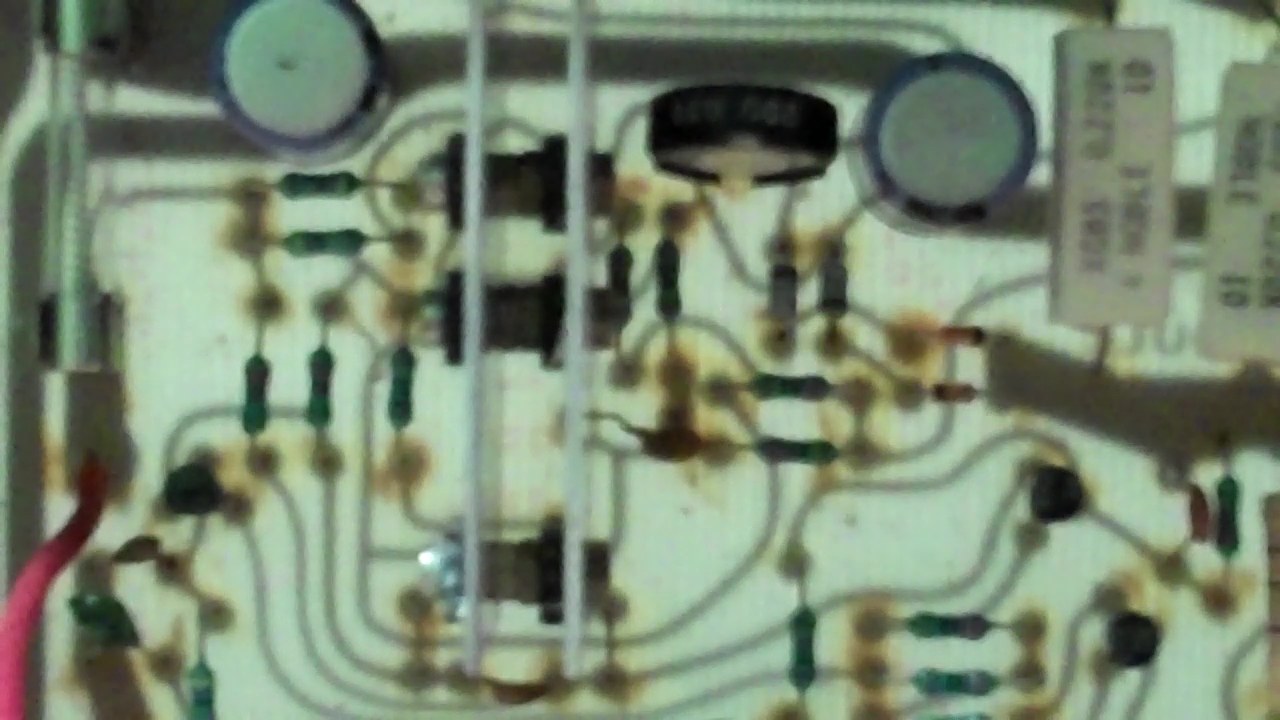
ETI 477 Power Module Circuit Board showing the bipolar transistors heatsink assembly.

Back in 1981 there was a design for a power amp kit, published by Electronics Today International.  The design was a pretty good one, which had very low THD figures and plenty of power.  More interesting to me was the idea that it would use MOSFET output stage instead of Power Transistors, or Valves.  The FET acted more like a valve in anycase, so all was good.  I had built it that same year, but had pretty much only ever used one channel, since I had only one speaker built. [other things to worry about i guess]

Even prior to that in the late ’70s at the University of Sydney I had attended all the graduate lectures of the great Cyril Murray [Electronics] and Richard Small [Audio].  These guys were the total gurus of amplifier and speaker design at the time and were really pushing the envelope in Sydney for how to make very high quality audio equipment – out of the new stuff – transistors – better materials – MOSFETs for example.  So when the ETI design came out, I could see the potential value and have something of the designs I had learnt from Dr Murray built into something I could put together.  Many others probably thought the same.


My son had his 18th birthday recently, and we had aquired two old speakers, so the thought was, lets connect them up and use those for the party.  It was a great idea, except that only one channel actually worked, the one i had used for the past 30 years.  The other channel was just creating lots of hum and noise.  So it was back to the single channel single speaker again.  The whole AMP / SPEAKER arrangement was placed outside in anycase, so it could have been cockroaches, insects, termites or any other kind of small living thing that tends to make its home in strange electronic equipment here.

Then, it was a long weekend, being in honour of the Queen of England, we all Aussies got Monday off work.  It is still raining Tuesday, and a short break over lunch..Looked inside, found about 6 resistors burnt out.  Here was a problem, no circuit diagram, and it took me a while to remember how the whole circuit worked as well.

So David Tilbrook had designed the AMP for the ETI magazine, and since the magazine was now out of date, i searched all over for someone on the web who knew anything about it…. Yes in fact., there were whole threads about this little known amp and its redesign by David Tilbrook, and the subsequent more advanced amplifier, the AEM6000, and if you are interested then join up with DIYAUDIO which is a pretty useful forum.

So this last Saturday, I downloaded the circuit, established which components were broken, went down to the local electronics place and could not believe that I could still buy all of the damaged components off the shelf.  I mean this amp was designed more than 30 years ago boys !.

So… then a day or so of painstaking replacement of burnt out tracks, and burnt out components.

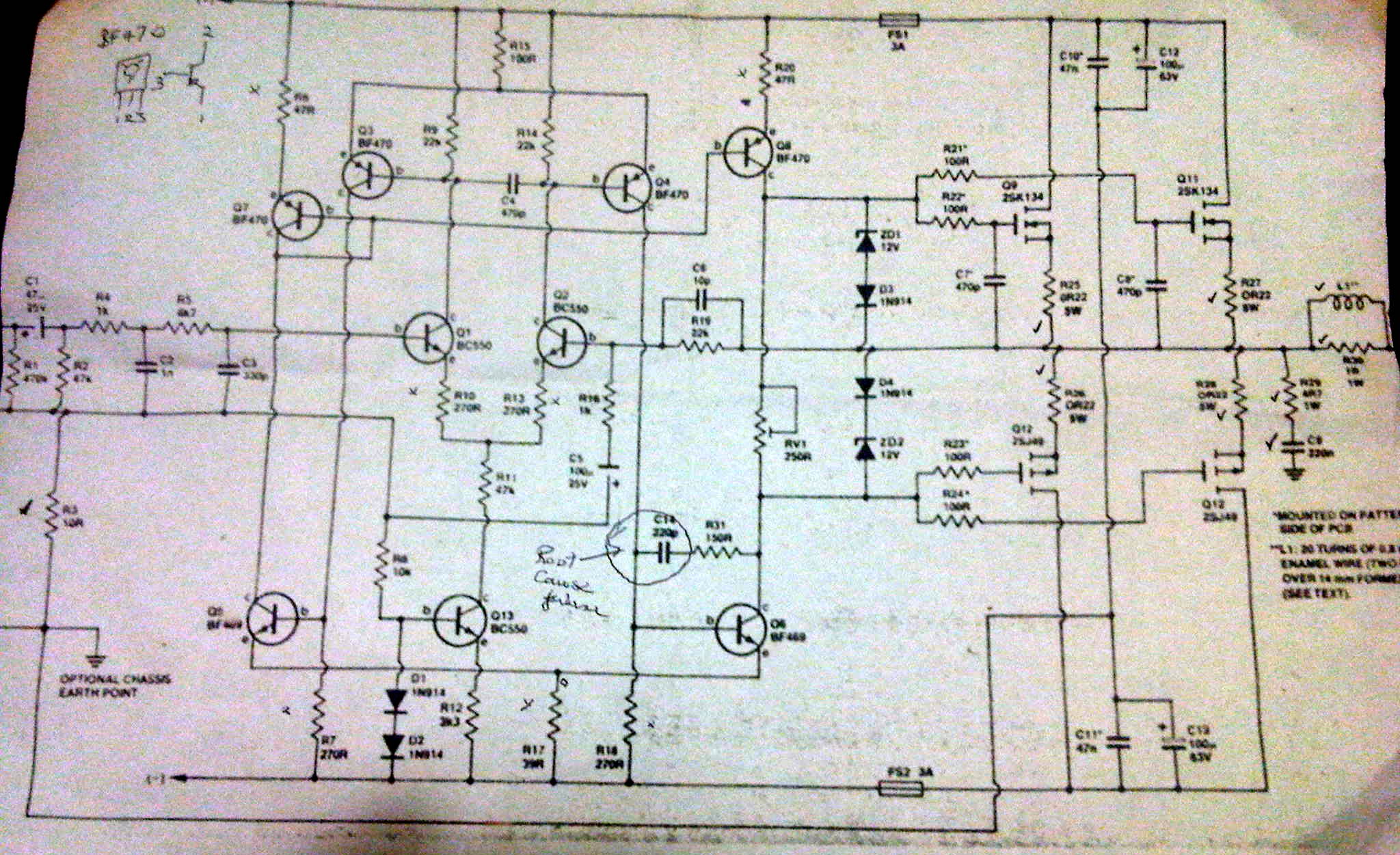
I switched it on.. !@#$!~ heaps of smoke started pouring out of one or two of the resistors.  But since I was watching I saw which resistor was going first.  It was one just connected to a capacitor, a very small feedback capacitor {C14}.  For that much power to burn out a resistor it had to be a shorted cap, never heard of that before.  I checked the resistors, black but still working, transistors should be ok.  Resistor values were out by around 10%.  I only had it on for around 3 seconds.

Replaced the resistors for the second time.

When I replaced the capacitor, a very small one, I noticed that it had been mounted quite close to a straight aluminium heatsink, which has all the bipolar power transistors mounted on it.  It may have been heat stress or something that caused the capacitor to fail.  When I replaced the capacitor, I made sure it was lying down on the PC board, well away from the the high temperature heatsink.  It heat had been the problem for the little capacitor , then it would not be a problem for this little guy in the future.

This time turned it on, it worked, but the sound was not good, it sounded like crossover distortion..

So I carefully poked simple multimeter probes into the high voltage part of the amp, connecting them to either side of the variable resistor RV1, and adjusted the bias on the MOSFET gates to the same as the working channel, about 1.4 volts dc.  It improved dramatically, and since the most sophisticated measuring equipment I have is my ears, and a Herbie Hancock electronic music record, I figured it would be ok.  I then double checked the steady state temperature on the large heatsink, and both channels were operating at around the same temperature [around 40C].

Now both channels sound identical and very clear.

A nice amp, a great designer, and made of useful components, which are still available. The board layout is simple, and there are many small capacitors put in to compensate the amp for parasitic noise and oscillations.  I don’t have any problem with the AMP, It had been built exactly to the instructions in the magazine at the time.  I think though if I wanted to build a new one I would probably built the AEM6000 with whatever other mods various enthusiasts have suggested on DIYAUDIO.

Annotated Circuit Diagram - showing failed capacitor

INV 11 – Robot Arm Wrestling – Leaf 4 – Adversarial Reflection

Attrib: Aralani

At around midnight, Ferdinand and Sally quit the pub, and both went off home.  Ferdinand got up to his hotel room, and sat and thought over the encounter.  Sally would prove to be quite an adversary he thought.  She had gotten the Integral Idea, and seemed yet to have some other thought.  Perhaps he had let the cat out of the bag a bit, since he knew that Integral itself would still not be enough.  He looked forward to getting an email or something, he wanted to continue the relationship, not necessarily as friendship, more the gamesmanship of it all.

Sally on the other hand went back to her condo in the nearby urban sprawl.  The drive down the freeway had been interesting.  Something that Freddo guy had said got her thinking.  It was something about the fact that the human being was not a predictable system to be controlled, that the human being holding the arm was second guessing the control strategy in the arm and actually beating it.  This meant she had to be a bit more clever than just putting in a dumb old controller.  OK putting in the integral component might help with stability, but this was a live smart human being on the end of the ARM.

Sally hummed herself a song to the tune of the bluesbreakers song that Freddo had commanded on the jukebox..

“Have you heard about my baby…

Yes how I love you don’t know…

Have you heard about my baby  ?

How I love, How I love you don’t know ~

I declare that that ARM baby ..

Yes… she… got a long way to go…

Sally’s baby, the ARM Robot Baby, yes, yes… mmmm.. got a long way to go.  Sally pulled into the drive. Let’s see how we do, she suggested to herself.